What comics should I upload?
Although Kidjutsu is primarily a directory of webcomics, we have built an excellent comic reading experience. We encourage you to upload the first few chapters/issues of your comic onto Kidjutsu for kids to reads. Once the kids are hooked, they will follow the links to your site to read more!
What is the upload process?
You can upload a comic by clicking on the "Upload a new comic" link in the Creator Area. The upload form consists of four steps: file upload, creator information, supplemental information, and submission agreement. We ask that you fill out all the required fields on each page.
Filling out the form typically takes about 15 minutes total.
How do I upload my files?
In the first step of the form, we ask you to upload a file to Kidjutsu. We accept a single pdf file or an archive of jpg/gif/png images as zip, rar, or cbr. Depending on your internet connection, it can take from 5 to 10 minutes to upload the file. Please be patient and just click "Upload" only once.
How should I name my images?
We do our best to infer the order of your comics from the file names. Images in archives will typically be sorted and then displayed in alphanumeric order.
If you have a cover image, it is important that the cover of the comic be the first file in a directory listing when sorted by filename or have the word 'cover' in the filename. For example, if your files are numbered numerically, e.g. "001.jpg", "002.jpg", you can rename your cover image to either "cover.jpg" or "000.jpg" to ensure that it gets processed before the other images in the archive.
Webcomics are often named by date. We can process this without modification.
What is the minimum image resolution?
We recommend that you upload your highest resolution images to allow us to scale the images. Anything above 120dpi should work well in our reader.
Is there a preferred image format?
We prefer the jpg and the png file format. gif tends to be too lossy when scaled.
How are webcomics displayed on the site?
Typically we ask creators to submit comics in smaller 30-80 page chunks as kids tend to have a short attention span. A lot of webcomics especially comic strips aren't naturally divided into chapters or issues. Webcomics creators have a few options here. They can submit the whole work as one volume or they can break up the collection into smaller volumes as if they were going to give it to a print publisher. The latter is actually preferred and it is a good exercise in preparation for eventually printing collections. For those who submit as one volume, you can periodically replace the old zip with a new zip. We also have a bookmark feature to let readers go back to where they left off.
Does your image processing stretch or expand the files?
We scale the images proportionally, so that it fills the screen width/height. That is why we ask for the highest possible resolution images to avoid blurry images. Also, the gif image format tends to not scale well, so jpg and png are the preferred image formats.
In the future, I plan to experiment a little more with the idea of keeping the original image size for strip comics. I understand that sometimes a 4-panel comic just doesn't need to be full screen width and it makes it harder for the reader to read.
How do I create a zip file?
How do I edit a comic after it has been published?
You can edit a comic at any time by clicking the "Edit" button in the upper-right corner of your comic. Just make your modifications and then click "Save" at the bottom of the form to commit your changes.
How do I upload a new set of images or a new cover for a published comic?
You can replace a comic at any time by clicking the "Edit" button in the upper-right corner of your comic. Just go to the Comic File section, click the "Remove" button to remove the current file, "Browse" to the new replacement file, click "Upload", wait for the upload to finish, and then click "Save" at the bottom of the Edit form.
To upload a new cover, just replace the old zip file with a new zip file that includes a cover. To let us know which image is the cover, just rename the image to have the word "cover" somewhere in the filename. Otherwise, we will assume the first file is the cover.
How do I unpublish/remove a comic?
At any time, creators can "unpublish" a comic by clicking on the "Unpublish" link on the comic page as shown in below:
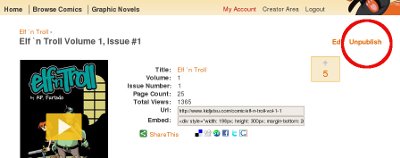
Creators can also request for complete deletion of their comics from our servers at any time. Just email
brian@kidjutsu.com and let me know which comics.